Components
Components attributes OSDK hooks to the React components that mounted them.
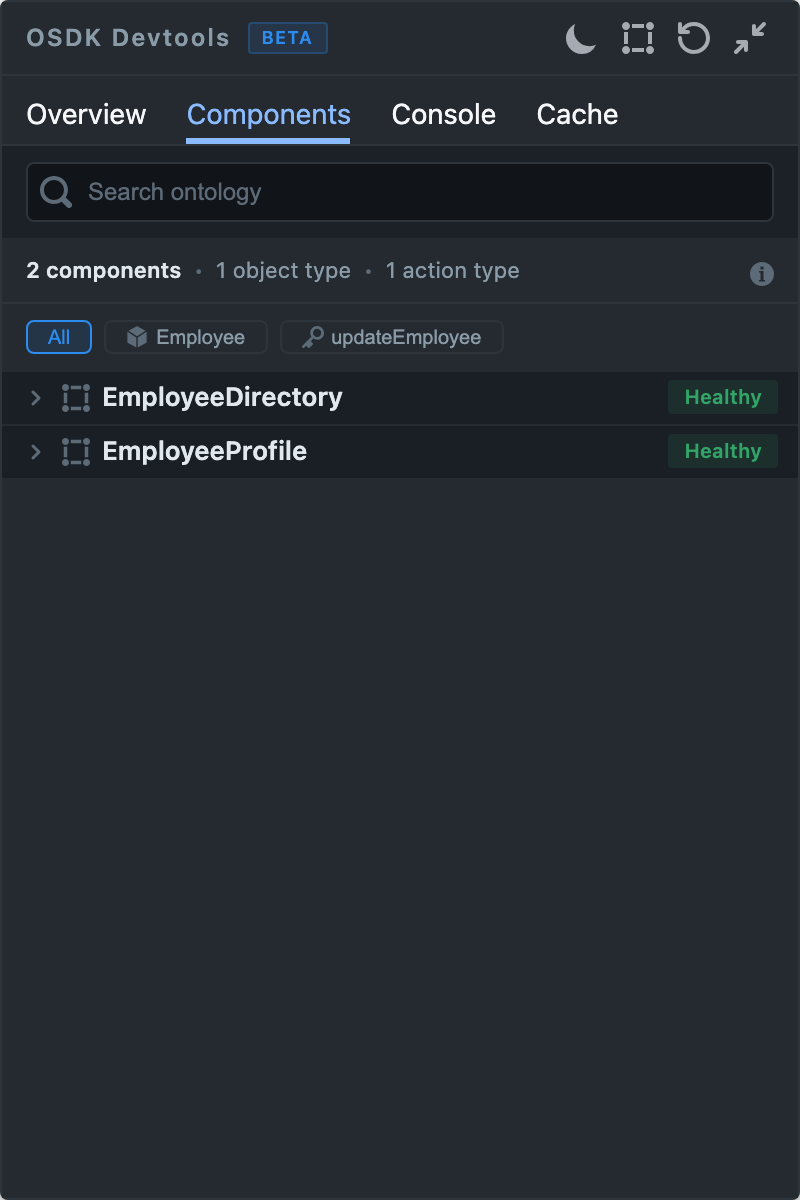
Find a component
Search matches component names and detected Ontology usage. The summary reports mounted component, object type, and action type counts. Select an object type or action filter to narrow the list.
Only components with detected @osdk/react hooks appear. Components that use raw network calls or another state library are outside this view.
Component details
Each component card groups its observed usage.
- Related objects lists detected object types and primary keys.
- Related actions lists calls made through
@osdk/react. - Related properties lists fields read by descendants.
- React props lists values captured from the mounted component.
The health badge remains Healthy unless the monitor detects wasted renders or a property that the component accessed in fewer than 10% of its renders. The property analysis begins after the component has rendered more than five times. An unhealthy card summarizes the detected waste.
When to use it
Use Components to find which part of the React tree owns a query, compare sibling components that read the same object type, or trace an overfetching recommendation from Overview back to its component.